Yalinda: A Luxe Script Font for Handmade Invitations & Labels
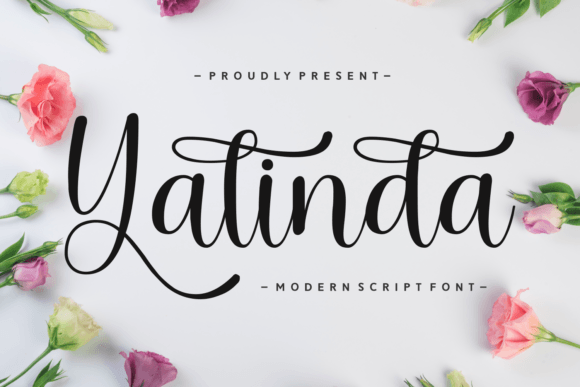
If you’ve ever spent hours tweaking a wedding invitation in Canva or wrestling with letter spacing on a Cricut project, you know how much difference the right script font makes—not just in looks, but in how your product feels to the customer. Yalinda is that rare modern script font that balances elegance with real-world usability. It’s not overly fussy, not too fragile-looking, and never sacrifices readability for flair. As someone who designs printable wedding suites, boutique soap labels, and seasonal SVG bundles for Etsy, I reach for Yalinda when I need warmth, luxury, and quiet confidence—all in one typeface.
Yalinda’s fluid strokes and thoughtfully designed swashes give it movement without chaos. Unlike some script fonts that blur together at small sizes or collapse under vinyl cutting pressure, Yalinda holds its shape beautifully—even at 12 pt on a kraft paper tag or as a 3-inch cut-out for a farmhouse welcome sign. Its sophistication comes from intention: each curve is calibrated, each terminal refined. That means your hand-poured candle label won’t look like a last-minute afterthought. It’ll look like something customers want to photograph and share.
For physical product makers, Yalinda shines in high-touch applications where first impressions matter most. Think: engraved wooden gift tags, foil-stamped greeting cards, heat-pressed tote bags, or laser-cut acrylic signs. Because its letterforms have generous x-height and open counters, it remains legible even when scaled down for mini sticker sheets or printed on textured cotton stationery. I’ve used it for bridal shower invitations (paired with a crisp sans serif for body text), custom tea towel prints (where the swashes echo hand-embroidered flourishes), and holiday ornament packaging—each time getting compliments on “how elegant and *real* it feels.”
It’s also a standout for digital printables. Whether you’re selling planner stickers, printable wall art, or editable Canva templates, Yalinda adds instant polish. Its natural rhythm works especially well for quotes, monograms, and short phrases—“Bloom,” “Gather,” “Made With Love”—without needing extra design tricks. For longer blocks of text? Stick to titles, headers, and accent lines. Yalinda isn’t built for paragraphs, and that’s exactly why it excels as a display font: it draws attention where you want it, then steps back gracefully.
Practicality matters just as much as beauty when you're prepping files for cutting machines. Yalinda cuts cleanly in Silhouette Studio and Cricut Design Space—no overlapping paths or stray nodes. For best results, avoid using the most delicate swash alternates on sub-¼” stickers or fine-detail iron-on transfers. Instead, lean into the standard characters for small labels and reserve the extended swashes for hero elements like invitation front panels or large-scale wall decals. Always test a single letter at your target size before batching—especially if printing on dark stock or using metallic foil.
Font pairing is where Yalinda truly sings. I almost always pair it with a clean, neutral sans serif—think Montserrat, Poppins, or Inter—for body copy, pricing, or ingredient lists. This contrast gives handmade products visual hierarchy and professional polish. For a warmer alternative, try a low-contrast serif like Playfair Display or Cormorant Garamond. The key is balance: let Yalinda carry the emotional weight, while your secondary font handles clarity and consistency across your brand.
Yalinda lives in the Script Amp category for good reason—it’s engineered for impact, not just decoration. You’ll find multiple swash alternates, contextual ligatures, and stylistic sets that let you fine-tune tone: playful for baby showers, refined for vow renewals, softly romantic for anniversary cards. It supports multilingual Latin-based languages (including accented characters for Spanish, French, and German), which matters if you sell internationally or design bilingual wedding signage. File formats typically include OTF and TTF—both fully compatible with Adobe apps, Affinity Suite, Cricut Access, and free tools like Inkscape and DaVinci Resolve’s text tools.
Licensing is non-negotiable if you’re selling physical goods or digital downloads. Yalinda is a commercial font, meaning you’re covered to use it in client work, printed stationery, SVG files for cutting machines, and digital templates—as long as your license permits product resale. Always verify the included license terms (most Script Amp fonts include extended commercial use), especially if you’re bundling Yalinda into editable Canva templates or offering it as part of a design resource pack. When in doubt, check directly with the foundry—clarity here protects your shop and your reputation.
Real examples from my own shop: Yalinda on matte-finish lavender sachet tags gave a luxury apothecary vibe without looking stiff; on rustic wood slice coasters, its curves echoed the grain beautifully; and for a summer wedding collection, I used its swashes to trace floral motifs in layered SVGs—customers loved how “hand-drawn yet precise” it felt. Even small touches count: the “Thank You” on a thank-you card, the “Small Batch” line on a hot sauce label, or the “Est. 2022” on a ceramic mug—Yalinda makes those details feel intentional, not incidental.
At its core, Yalinda isn’t just another pretty script font. It’s a tool that helps handmade sellers communicate care, quality, and personality—without saying a word. When your customers hold a product set in Yalinda, they don’t just see typography. They feel the thought behind it. And in a crowded marketplace, that subtle resonance is what turns one-time buyers into repeat fans—and keeps your shop top-of-mind for their next special occasion.